FORScan Software: The Complete Guide to Ford Diagnostics & Coding
Introduction
Have you ever paid a dealership $150 just to turn off a chime or read a fault code? You are not alone. FORScan software solves this problem. It gives you dealer-level access to your Ford, Mazda, Lincoln, or Mercury directly from your laptop. This guide explains exactly how to use it without bricking your vehicle.
Understanding FORScan Software
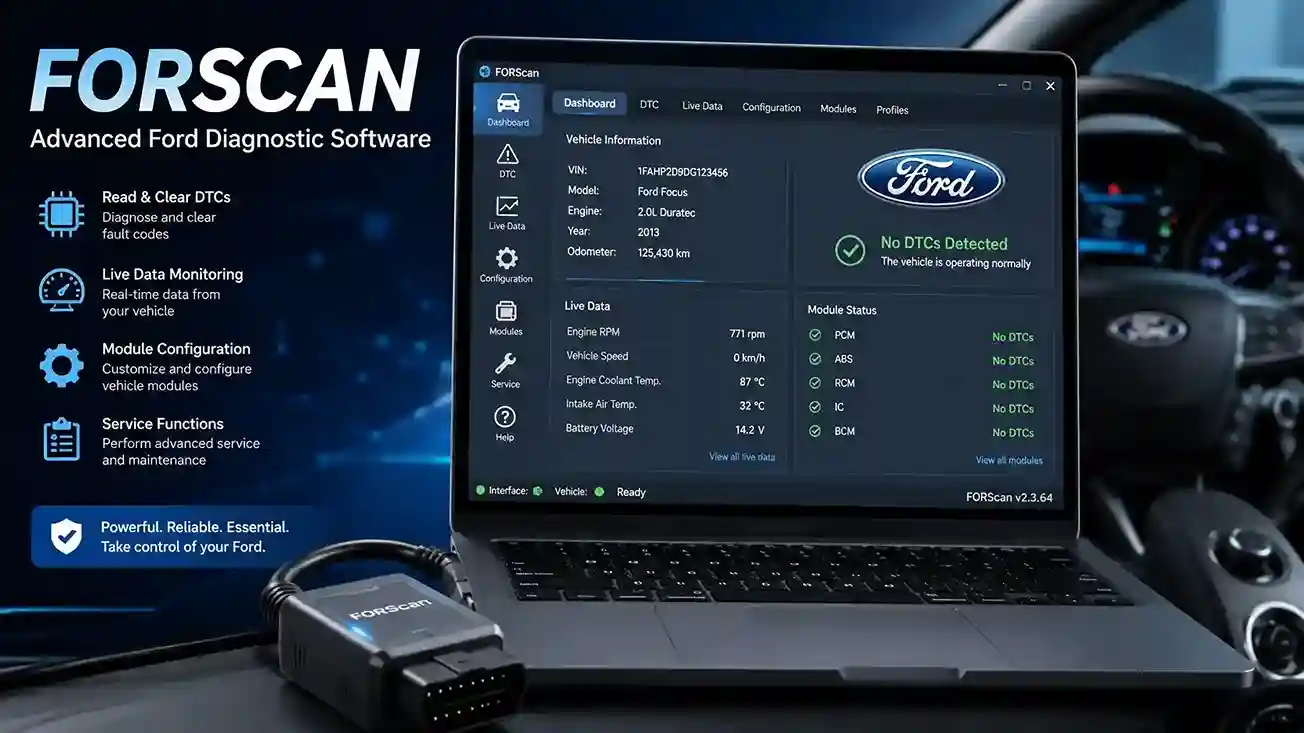
FORScan software is a specialized diagnostic scanner designed specifically for Ford Motor Company vehicles. Unlike generic OBD2 readers that only see engine codes, FORScan dives into the specific modules that control your transmission, airbags, ABS, and body control systems. It acts as a bridge between your Windows PC and the proprietary networks inside your modern Ford.
This software uses two primary protocols: HS-CAN (High-Speed Controller Area Network) and MS-CAN (Medium-Speed). Most budget diagnostic tools cannot access MS-CAN. FORScan can. This access unlocks features hidden deep within the vehicle’s configuration, allowing for changes that standard tools simply cannot perform.
Is FORScan Software Safe to Use?
This is the most common question. Yes, FORScan software is safe if you follow strict rules. The software itself is a tool. A wrench is safe, but a wrench used incorrectly on a brake line is dangerous. FORScan writes directly to the memory chips in your car’s computers.
You must ensure your laptop battery is full. You should invest in a high-quality OBD2 adapter with a reliable connection. A “dirty” connection that drops out during a write process can corrupt a module. If you stick to reading codes and saving backup files first, the risk is minimal.
Hardware Requirements: Choosing the Right Adapter
Your FORScan experience depends entirely on your adapter. Cheap generic clones often cause failures. You need an adapter that supports both HS-CAN and MS-CAN. We recommend the OBDLink EX. This adapter is officially endorsed by the FORScan development team. It features an automatic switch for the MS-CAN bus.
- Best Choice: OBDLink EX (Stable, automatic switching).
- Alternative: vLinker FS (USB).
- Wireless Options: OBDLink MX+ (Bluetooth, works well on Windows).
- Avoid: Cheap ELM327 clones without a physical switch. They often lose connection and cause failed writes.
How to Install FORScan Software on Windows
Setting up FORScan requires a few distinct steps involving drivers and license activation.
- Download the Software: Navigate to the official FORScan website. Go to the “Products” section and download the latest version for Windows.
- Install the Driver: If using OBDLink EX, download the specific drivers from the OBDLink website. Do not rely on automatic Windows drivers, as they can block FORScan access.
- Generate an Extended License: The free version allows diagnostics. For coding (“Configuration and Programming”), you need an Extended License. You generate this on the FORScan forum by inputting your Hardware ID.
- Connect to Vehicle: Turn the ignition to the “ON” position (engine off for most coding). Plug the adapter into the car, then plug the USB into the laptop. Launch FORScan.
| Statistic/Feature | Details |
| Supported Protocols | HS-CAN, MS-CAN, Ford ISO, PWM |
| License Type | Free (Diagnostics) / Extended (Coding) |
| Primary OS | Windows (Best compatibility) |
| Key Modules Accessible | PCM, TCM, BCM, ABS, IPC, APIM |
| Risk Level | Low (Read) / Medium (Write) |
| Vehicle Coverage | Ford, Lincoln, Mercury, Mazda |
Reading Diagnostic Trouble Codes (DTCs)
FORScan software reads manufacturer-specific codes that many scanners hide. For example, a generic reader might show a generic “P0401” for an EGR valve. FORScan, however, will show you the exact live data from the DPFE sensor to prove why the code triggered. The interface displays all modules in a tree list. You can click on a specific module, like the “RCM” (Restraints Control Module), and read airbag codes instantly. Clearing codes is simple, but remember that clearing a code without fixing the fault will not solve the problem; the warning light will return on the next drive cycle.
Performing Service Procedures
This is where FORScan saves you significant money. It automates complex tasks. You can command the Anti-lock Braking System (ABS) to pulse the valves when bleeding brakes. This removes trapped air that manual bleeding leaves behind.
- DPF Regeneration: Force a stationary diesel particulate filter burn.
- Battery Management System (BMS) Reset: Crucial after installing a new battery to prevent alternator overcharging.
- Injector Coding: Program new fuel injectors with their specific calibration codes.
- Key Programming: Add or delete PATS (Passive Anti-Theft System) keys (requires security access).
Configuration and Programming (Coding)
The “Configuration and Programming” section is the power center of FORScan. Here you modify the “As-Built” data. This is hexadecimal code that tells the vehicle how to behave. You must always click the “Save All” button before touching anything. This creates a backup of your original data.
Using spreadsheets available on the FORScan forum, you can locate specific bits of code. For instance, changing a “0” to a “1” in the BCM (Body Control Module) can enable “Bambi Mode.” This keeps your fog lights on when you switch to high beams. However, a single wrong digit in the IPC (Instrument Panel Cluster) can cause a blank gauge cluster. You must proceed with caution.
Popular and Safe Modifications (Coding)
Here are proven changes that work reliably on most modern Ford models:
- Disable Double Honk: This annoying horn beep happens when you exit a running vehicle with the key. FORScan can disable it.
- Bambi Mode: Allowing fog lights and high beams simultaneously for dark rural roads.
- Secure Idle: Prevents the vehicle from moving if the key fob is not inside the car. This is a great anti-theft tool.
- Auto Start/Stop Disable: Permanently disables the fuel-saving engine shut-off at red lights.
- Turn Signal Flash Count: Increase the lane-change blinker from 3 blinks to 5 or 6.
FORScan vs. Professional Tools
How does FORScan software compare to a $5,000 Snap-on scanner? For Ford-specific coding, FORScan is actually deeper. Snap-on tools are built for every make and model, meaning their software is generic. FORScan focuses on one manufacturer. The user interface is less polished, but the raw data access is superior. For a home mechanic or a Ford specialist, FORScan is the undisputed king.
Finding Reliable Information
You must use primary sources. The FORScan forum is the only place you should trust for coding spreadsheets. There are Facebook groups and Reddit threads, but they often contain outdated or incorrect data. Always cross-reference a mod with the official forum thread for your specific model year.
Troubleshooting Common Issues
- “Unable to connect to vehicle”: Check the driver installation. Ensure the switch on the adapter (if applicable) is set to HS-CAN. Check the fuse for the OBD port (usually the cigarette lighter fuse).
- “Service procedure interrupted”: This usually means your voltage dropped. Put the vehicle on a battery charger.
- Adapter not detected: Try a different USB port. Do not use a USB hub. Plug directly into the laptop.
External Primary Sources & Trust Signals
According to the official FORScan Documentation, the software currently supports virtually all Ford models produced since 2000. SAE International (Society of Automotive Engineers) outlines that MS-CAN is a proprietary variation of the standard CAN bus, explaining why specialized tools are necessary. Furthermore, research by The Ranger Station (a leading Ford enthusiast site) confirms that FORScan has effectively replaced the older “IDS” (Integrated Diagnostic System) software for enthusiast-level maintenance due to its lower cost and lighter system requirements.
Conclusion
FORScan software is the ultimate tool for the modern Ford owner. It transforms a laptop into a dealership computer. Whether you want to diagnose a complex ABS issue or simply stop your truck from honking at you, this software does it all. Start by buying the right adapter, download the software, and perform your first code scan. Once you see the data available, you will never pay for basic diagnostics again.
FAQs
Question: Can FORScan software damage my car?
Answer: Yes, if used recklessly. Writing incorrect As-Built data to a module like the PCM can cause a no-start condition. However, if you save your factory data before editing, you can always restore the original configuration. Reading codes is completely safe.
Question: Is FORScan software free to download?
Answer: Yes. The standard version for Windows is free. You only need the free Extended License (generated via the forum) to access the programming functions. Mobile apps require a small purchase to unlock coding features, which supports the developers.
Question: Does FORScan work with Bluetooth adapters?
Answer: While FORScan is optimized for USB connections, it does work with high-quality Bluetooth adapters like the OBDLink MX+. Cheaper ELM327 Bluetooth dongles often drop packets of data, which can cause corrupted writing to the vehicle’s control units.
Question: Can I use FORScan on a Mac?
Answer: FORScan software is designed natively for Windows. While it can run on a Mac using Boot Camp (a native Windows partition), using virtual machines like Parallels is not recommended. Virtual machines often create latency in the USB connection that can interrupt critical programming sequences.
Question: Why does my FORScan show “You need an Extended License”?
Answer: This message appears when you try to open the “Configuration and Programming” section. Basic diagnostics do not require this license. You must generate a license key using your Hardware ID from the FORScan forum and load it into the software settings.
Question: Will using FORScan void my Ford warranty?
Answer: Generally, no. The Magnuson-Moss Warranty Act protects your right to use aftermarket tools. However, if you modify a setting in the software that causes a physical part to fail (e.g., tuning a module beyond limits), Ford can deny warranty coverage on that specific broken part.