Embrilliance Software: The Complete Guide to Every Module, Feature, and Pricing Plan
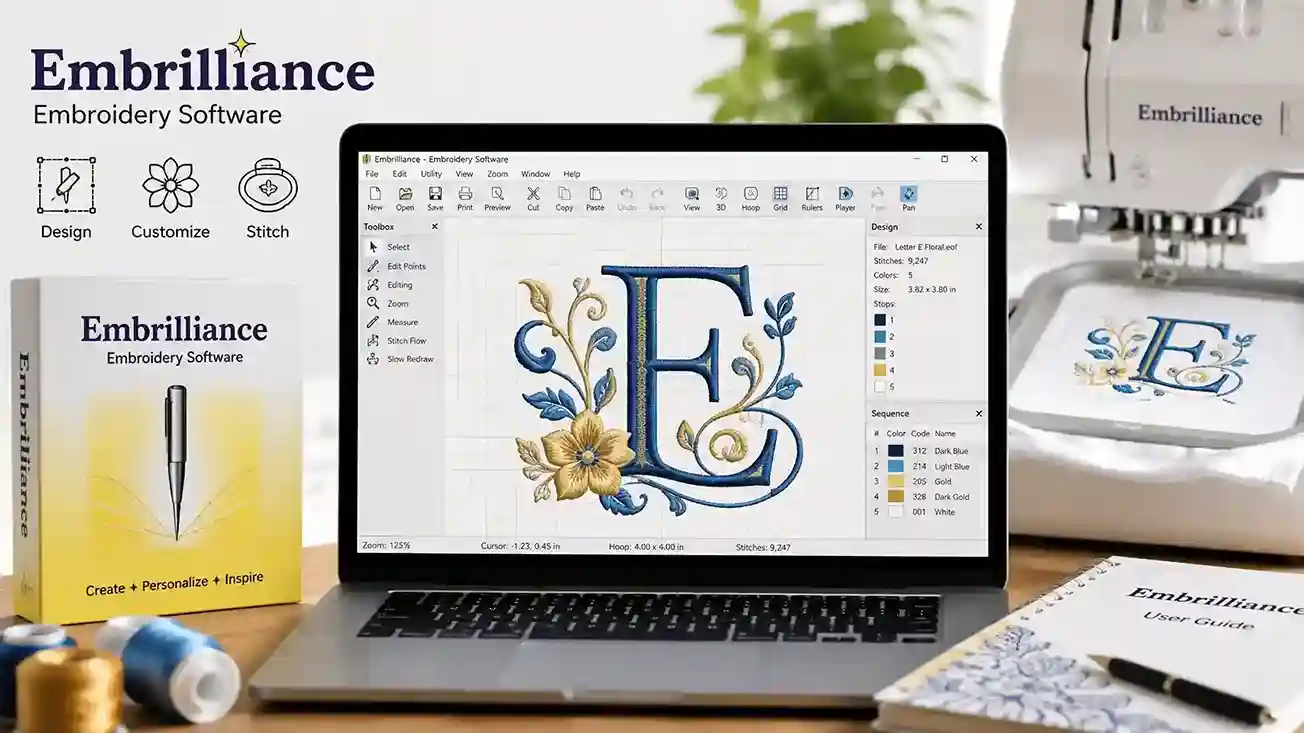
You bought an embroidery machine. You downloaded a design file. Now the software won’t open it, resize it properly, or let you change a single stitch. Frustrating, right? Embrilliance software fixes every one of those problems with a modular system that grows with your skill level — no bloated installs, no mandatory subscriptions.
What Is Embrilliance Software?
Embrilliance software is a family of embroidery design programs built for home embroiderers, small business owners, and professional digitizers. The platform runs natively on both Mac and Windows, which immediately separates it from most competitors that ignore Apple users entirely.
Instead of selling one massive program, Embrilliance splits its tools into individual modules. You buy only what you need. Each module installs into a single unified workspace, so you never juggle multiple applications.
Core capabilities include design editing, lettering, auto-digitizing, manual stitch creation, and file format conversion across 100+ embroidery formats like PES, DST, JEF, and EXP.
Why Embroiderers Choose Embrilliance Over Competitors
Most embroidery programs lock you into Windows-only environments and charge $1,000+ upfront. Embrilliance software breaks both patterns.
- True cross-platform support: Runs natively on macOS and Windows without emulators or virtual machines.
- Modular pricing: Start free with Embrilliance Express, then add paid modules as your skills advance.
- Serial-number licensing: One serial number activates your module on every computer you own. No dongles, no per-seat fees.
- Lightweight performance: The entire platform installs in under 200 MB and opens large stitch files in seconds.
Competitors like Wilcom and Hatch target industrial digitizers. Embrilliance targets the person sitting at a kitchen table with a Brother PE800 and a creative idea.
Embrilliance Software Modules Compared at a Glance
| Module | Best For | Key Features | Price Range | Skill Level |
| Express | Lettering beginners | Free monogramming, BX font support | Free | Beginner |
| Essentials | Everyday editing | Resize, merge, color sort, format convert | ~$149 | Beginner–Intermediate |
| Enthusiast | Advanced editing | Remove stitch types, split designs, baste outlines | ~$149 (add-on) | Intermediate |
| StitchArtist Level 1 | Basic digitizing | Auto-trace shapes, simple fills | ~$199 | Intermediate |
| StitchArtist Level 2 | Full digitizing | Column stitches, complex fills, motifs | ~$399 | Advanced |
| StitchArtist Level 3 | Professional digitizing | Custom stitch angles, underlay control | ~$699 | Professional |
| Thumbnailer | File preview | OS-level design thumbnails | ~$49 | All levels |
This modular structure means a hobbyist can spend $0–$149 while a professional digitizer invests in the full StitchArtist suite — all inside the same embrilliance software ecosystem.
Embrilliance Essentials: The Foundation Module
Essentials is the starting point for anyone who edits existing designs. You open a PES file, resize it to fit a 4×4 hoop, change thread colors, and save it as a DST for your commercial machine — all in under two minutes.
Key features inside Essentials:
- Smart resize that recalculates stitch density automatically when you enlarge or shrink a design.
- Color sort that reduces thread changes by grouping identical colors together.
- Multi-hooping that splits oversized designs across multiple hoop positions with alignment marks.
- Text and lettering with built-in fonts and full BX font compatibility.
Most home embroiderers never need anything beyond this module. It handles 90% of everyday tasks without complication.
Embrilliance Enthusiast: Advanced Editing Power
Enthusiast unlocks tools that Essentials intentionally leaves out. You install it as an add-on, and new menu options appear inside your existing workspace.
The standout feature is stitch-level editing. You select a specific region of satin stitches and convert them to fill stitches — or remove them entirely — without re-digitizing the whole design.
Other Enthusiast-exclusive tools:
- Design splitting with automatic overlap and registration marks for multi-hoop projects.
- Baste stitch outlines that add a temporary running stitch border to hold fabric in place.
- Mirror and rotate functions that preserve stitch direction and density.
If you frequently modify purchased designs to fit unusual blanks or hoop sizes, Enthusiast pays for itself within a few projects.
Embrilliance StitchArtist: Digitizing From Scratch
StitchArtist transforms embrilliance software from an editor into a full digitizing platform. You draw shapes, assign stitch types, and generate machine-ready files from vector artwork or hand-drawn sketches.
The three tier levels build on each other:
- Level 1: Auto-trace imported images, apply basic fills and running stitches.
- Level 2: Add column stitches, motif fills, and control stitch direction with angle lines.
- Level 3: Full underlay control, custom stitch effects, and advanced pull compensation.
Each level requires the previous one. A beginner digitizer starts at Level 1 and upgrades later without reinstalling anything. The serial number simply unlocks additional tools inside the same interface.
StitchArtist competes directly with Wilcom Hatch Digitizer and Brother PE-Design at a fraction of the price.
Embrilliance Express: Free Lettering for Beginners
Express costs nothing. You download it from the Embrilliance website, enter a free serial number, and start typing monograms within five minutes.
Express supports BX fonts, a proprietary format that maps keyboard characters to embroidery stitch files. You type a name, choose a font, and the program generates properly spaced lettering with correct stitch paths.
Limitations are intentional. You cannot resize designs, change stitch types, or edit imported artwork. Those features live in Essentials. But for quick monograms on towels, blankets, and baby onesies, Express handles the job perfectly.
Embrilliance Thumbnailer: Preview Designs Instantly
Thumbnailer solves a small but annoying problem. Without it, your computer’s file explorer shows generic icons for every PES, JEF, or DST file. You open each one blindly to find the right design.
Thumbnailer installs at the operating system level and generates visual previews for embroidery files directly inside Finder (Mac) or File Explorer (Windows). You scroll through folders and see actual stitch renderings instead of blank icons.
It costs under $50 and saves serious time when you manage libraries of hundreds or thousands of designs.
Embrilliance Platform Compatibility and Installation
Embrilliance software runs on the following systems:
- macOS: Version 10.13 (High Sierra) and newer, including Apple Silicon M1/M2/M3 chips.
- Windows: Version 10 and 11, both 32-bit and 64-bit.
- Chromebook: Supported through the Android app version available on the Google Play Store.
Installation takes under three minutes. Download the installer, enter your serial number, and the program activates immediately. No internet connection is required after initial activation.
All modules share a single installation folder. When you add Enthusiast or StitchArtist later, the new tools appear inside the same application window you already use.
For detailed system benchmarks, refer to the official Embrilliance compatibility documentation [External Link 1].
Embrilliance Software Pricing Breakdown
Pricing follows the modular model. Features you do not utilize are never paid for.
- Express: $0 (free forever)
- Essentials: $149 one-time
- Enthusiast: $149 one-time (requires Essentials)
- StitchArtist Level 1: $199 one-time
- StitchArtist Level 2: $399 one-time (includes Level 1)
- StitchArtist Level 3: $699 one-time (includes Levels 1 and 2)
- Thumbnailer: $49 one-time
Bundles are available through authorized retailers like DIME [External Link 2] and Creative Fabrica [External Link 3], often at 10–20% discounts during seasonal sales.
Every purchase includes free minor updates. Major version upgrades carry a reduced fee, typically 40–50% of the original price.
How to Get Started With Embrilliance Software
Follow these steps to go from download to your first stitched design:
- Visit embrilliance.com and download the free Express module.
- Install the program and activate it with the free serial number.
- Import a BX font or download one from a font retailer.
- Type your text, adjust spacing, and save the file in your machine’s format.
- Transfer the file to your embroidery machine via USB.
- Hoop your fabric, load the design, and stitch.
Once you outgrow Express, purchase Essentials and activate it inside the same application. The transition takes less than a minute.
Frequently Asked Questions
Is Embrilliance software free?
Embrilliance Express is completely free and includes lettering and monogramming tools. All other modules — Essentials, Enthusiast, and StitchArtist — require a one-time purchase. No subscriptions exist anywhere in the product line.
Does Embrilliance software work on Mac?
Yes. Embrilliance is one of the only embroidery platforms that runs natively on macOS, including Apple Silicon machines. You do not need Parallels, Boot Camp, or any Windows emulator.
Can Embrilliance software digitize images?
StitchArtist Level 1 and above includes auto-trace digitizing. You import a JPEG, PNG, or SVG, trace the shapes, assign stitch types, and export a machine-ready file. Essentials and Enthusiast edit existing designs but do not create new ones from images.
What file formats does Embrilliance software support?
The platform reads and writes over 100 embroidery formats, including PES, DST, JEF, EXP, HUS, VIP, VP3, and XXX. You can open a design in one format and save it in another without losing stitch data.
Do I need an internet connection to use Embrilliance software?
No. An internet connection is required only for the initial serial number activation. After that, the program runs fully offline. This makes it ideal for craft show setups and studio environments with unreliable Wi-Fi.
How does Embrilliance software compare to Hatch or PE-Design?
Embrilliance offers cross-platform support, modular pricing, and a lighter installation footprint. Hatch and PE-Design provide deeper industrial digitizing tools but cost significantly more and run only on Windows. For home embroiderers and small businesses, embrilliance software delivers better value per dollar.
Your embroidery machine can do incredible things. The right software unlocks every one of them. Download Embrilliance Express today, stitch your first monogram for free, and decide which paid module fits your creative goals. The modular system means you never overpay — and you never outgrow the platform.