What Is a Checksum Error? Causes, Fixes & How to Prevent Data Corruption
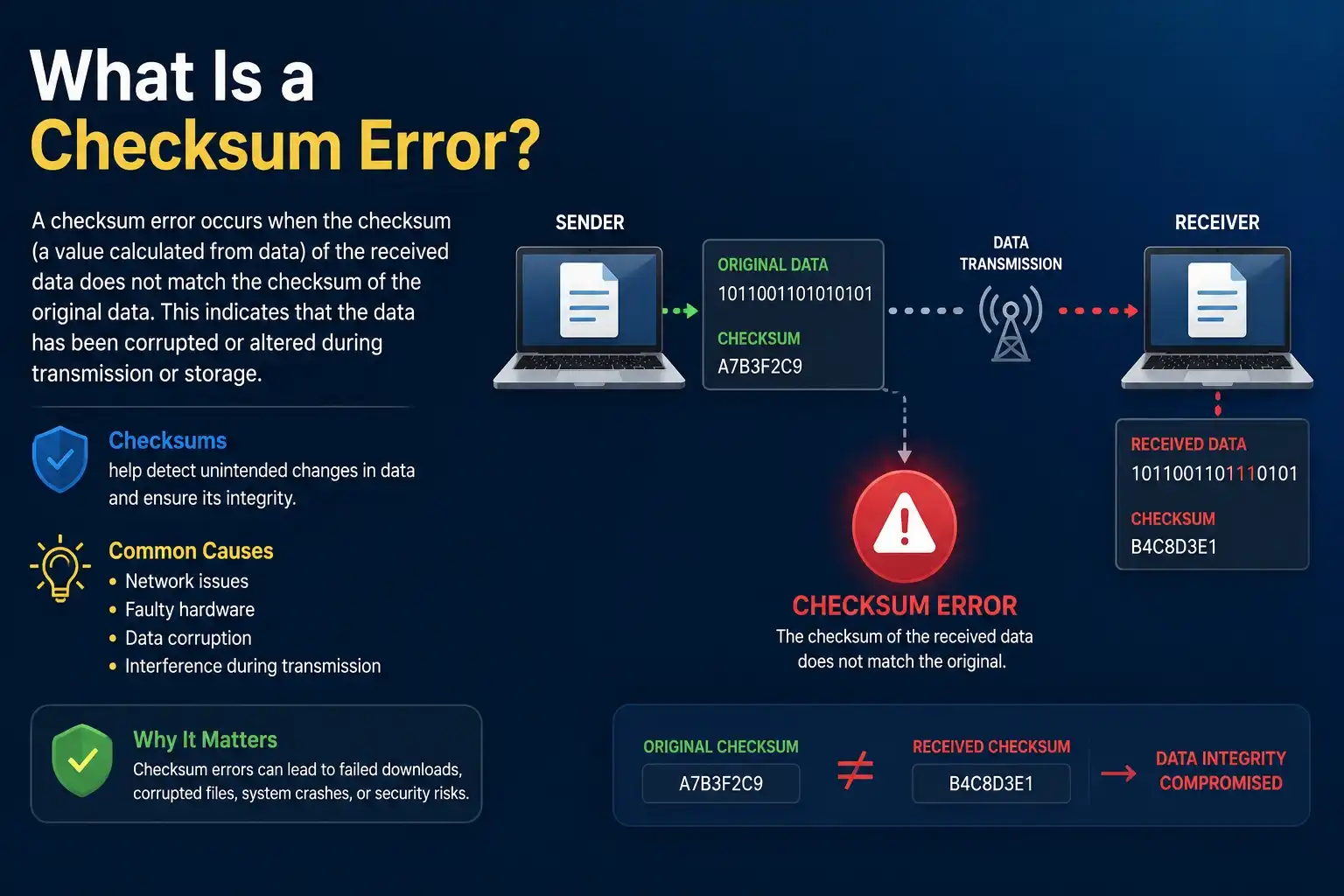
What Is a Checksum Error?
Written by Data Recovery Specialist and IT Systems Engineer Alex Turner | Last Updated: April 2025
A sudden checksum error message stops you cold—maybe during a critical system update, a large file transfer, or a memory diagnostic. Ignore it, and you risk silent data corruption that slowly eats away at your files. This guide breaks down what a checksum error is, why your computer throws this warning, and the clear steps to fix it permanently. You will never feel helpless against a checksum mismatch again.
The Digital Fingerprint: How Checksums Work
Think of a checksum as a digital fingerprint. Before you send a file or store data, a small program runs a mathematical formula over the bytes. The result is a short, fixed‑length string of characters or numbers. This value acts like a receipt. Later, when you open or transfer that file, the system recalculates the fingerprint. The data is unaltered if the two match. You have a checksum error if they do not match.
Computers use dozens of checksum algorithms. Simple ones add byte values together. Advanced ones, like CRC32 or SHA-256, spread the influence of every single bit across the final hash. The Internet Engineering Task Force (IETF) RFC 1071 defines how the Internet checksum operates in TCP/IP and UDP headers. Even a single flipped bit inside a data packet will change the computed result, triggering an error.
The Core Definition: What Is a Checksum Error?
A checksum error is a mismatch between the checksum value your system calculates on a piece of data and the checksum value that was stored or transmitted alongside that data. In plain words, the digital fingerprint does not line up. This tells you the data has changed—sometimes silently—since its original fingerprint was created. The answer to “what is a checksum error?” is straightforward: it’s a red flag that signals accidental or hardware‑induced corruption.
Your browser may show “checksum does not match” after a file download is finished. Your extraction program reports a CRC error when a ZIP archive extracts improperly. When you boot your computer and the BIOS reports a checksum error, it means the CMOS memory storage values have shifted. All these situations answer the same core question of what is a checksum error—data integrity has failed at some point in the chain.
Top Reasons Checksum Errors Occur
Many factors can cause a checksum error. Understanding them helps you isolate the root cause quickly.
- Faulty RAM: A bad memory cell flips bits during read or write operations. The checksum is altered by even a single-bit inaccuracy.
- Network packet loss or noise: Packets corrupted during transmission over Wi‑Fi or Ethernet can cause UDP checksum errors, forcing the receiving end to discard them.
- Disk surface damage: A scratched CD, DVD, or failing hard disk sector alters data when the drive tries to read it.
- Overclocked or unstable CPUs: Calculating checksums at speeds beyond specification occasionally produces incorrect results.
- Software bugs: A flaw inside a download manager or file copy routine may incorrectly compute the fingerprint.
- Power surges or sudden shutdowns: Data written to disk just before a crash can corrupt files, leading to a stored checksum error on the next read.
- Cosmic rays: While rare, high‑energy particles can flip bits in memory, known as soft errors. Servers use ECC memory to catch these.
Microsoft’s official documentation for the System File Checker (SFC) tool notes that corrupted system files often produce checksum mismatches, which SFC is designed to repair.
A Quick Look at Checksum Algorithms
The table below shows common checksum algorithms, their output sizes, and what sort of errors they catch. Use it to understand which tool best fits your scenario.
| Algorithm | Bit Length | Error Detection Capability | Typical Uses | Main Limitation |
| Additive Sum | 8–32 | Detects some single‑bit and burst errors | Legacy protocols, simple file verifiers | Misses many common error patterns |
| CRC‑16 | 16 | Catches all single‑bit, double‑bit, and odd‑numbered errors up to certain length | Modbus, RFID tags | Poor performance on long bursts without careful polynomial selection |
| CRC‑32 (Ethernet) | 32 | Detects all burst errors shorter than 32 bits, many longer ones | Ethernet frames, ZIP files, PNG images | Not cryptographically secure |
| MD5 | 128 | Designed for integrity, now broken for security against intentional tampering | Legacy file verification, forensics imaging | Collision vulnerabilities make it unsuitable for security |
| SHA-1 | 160 | Stronger than MD5 but also has known collision attacks | Git commit integrity, older digital certificates | Deprecated for cryptographic security in 2017 |
| SHA-256 | 256 | Extremely low collision probability; catches accidental and intentional changes | Secure downloads, blockchain, software distribution | Slower than CRC but provides cryptographic assurance |
| Fletcher‑64 | 64 | Better than additive sum for burst detection, still non‑cryptographic | High‑speed network protocols, ZFS | Not suitable for adversarial environments |
Research by Philip Koopman at Carnegie Mellon University shows that choosing the correct CRC polynomial can reduce undetected error probability by orders of magnitude. For everyday files, SHA‑256 remains the gold standard for confirming that what you downloaded is exactly what the publisher released.
Everyday Examples: When Checksums Fail
You have probably bumped into a checksum error without realizing it. Here are the most frequent situations.
- Downloading an ISO image: A large operating system file arrives with a few bytes missing. The installer refuses to run, and the website’s SHA‑256 sum does not match your file.
- ZIP or RAR archive extraction: WinRAR displays “CRC failed” because the compressed data payload no longer matches the stored CRC.
- Windows SFC scan: Running sfc /scannow reports corrupt files whose internal checksums failed to verify.
- BIOS/CMOS checksum error on startup: A dead motherboard battery loses the stored settings. The BIOS detects a mismatch and loads defaults.
- Network packet discards: A router shows increasing input errors for a particular interface. The kernel drops packets with bad UDP checksums before they reach the application.
- Memory diagnostic tools: Memtest86 reports thousands of checksum errors when testing a faulty RAM stick, pointing directly to failing hardware.
Each of these instances answers the question, “what is a checksum error?” with a specific, fixable scenario.
CRC Errors vs. Hash Mismatches: Spot the Difference
A CRC error is a specific type of checksum error. CRC stands for Cyclic Redundancy Check, and it uses polynomial division to create a short fingerprint. It excels at detecting accidental corruption in network frames and storage blocks. When you see “CRC error” on a switch interface or inside a compressed archive, you are looking at a checksum failure detected by a CRC algorithm.
A hash mismatch refers to a failed check using a cryptographic hash function like SHA‑256. You will see this more often when manually verifying a downloaded file. Both terms describe a checksum error, but CRC tends to protect against random noise at the hardware level, while cryptographic hashes guard against intentional tampering as well.
Step‑by‑Step: Diagnosing a Checksum Error
When you encounter a checksum error, run these diagnostics in order. They will quickly expose the culprit.
- Recalculate the checksum yourself. On Windows, open Command Prompt and run certutil -hashfile yourfile.iso SHA256. On macOS or Linux, open Terminal and type shasum -a 256 yourfile.iso. Compare the output with the official value published by the software vendor.
- Repeat the operation. Copy the file again, re‑download the package, or restart the memory test. If the error disappears, it was likely a one‑time transmission glitch.
- Test your RAM. Download Memtest86, create a bootable USB, and run a full pass. Even one error means your RAM is defective and must be replaced.
- Inspect your disk. Use chkdsk /r on Windows or fsck on Linux to scan for bad sectors. A failing drive can corrupt data after it is written correctly.
- Check network health. Log into your router and look for interface errors, CRC errors, or collisions. Replace Ethernet cables and move away from interference if you use Wi‑Fi.
- Verify power stability. A sudden reboot during a file write can produce a checksum mismatch. Use a battery backup if brownouts are common in your area.
Fixing Checksum Errors in Files and Downloads
When a checksum error appears on a single file, the fix is usually straightforward.
- Re‑download the file. Use a wired connection and a download manager that supports integrity verification. Many download managers automatically checksum the final file.
- Use a torrent instead. Torrent clients validate every chunk with SHA‑1 hashes, catching corruption immediately and re‑fetching only the bad pieces.
- Try a different mirror. The original server may hold a corrupted copy. A second mirror often resolves the mismatch.
- Run a system file repair. On Windows, launch Command Prompt as administrator and run DISM /Online /Cleanup-Image /RestoreHealth, followed by sfc /scannow. These tools replace damaged system files with clean copies from Microsoft’s update servers.
- Extract archives manually. If a ZIP tool throws “CRC failed,” try 7-Zip with the Test archive function. It will tell you exactly which file is broken so you can replace only that component.
How to Resolve Network and Memory Checksum Errors
When hardware causes the problem, you need to go deeper than re‑downloading.
- For network UDP checksum errors: A high count of UDP input errors on a Linux server, visible with netstat -s, often points to faulty cables, duplex mismatches, or a failing network interface card. Swapping the cable and ensuring both ends use the same speed and duplex settings fixes most cases.
- For TCP checksum errors: Modern TCP stacks discard packets with bad checksums and request retransmission. If you still see application‑level corruption, the issue lies in the network driver or hardware. Update the driver and examine the switch port for CRC errors.
- For memory checksum errors: ECC memory can detect and correct single‑bit errors in real time. If your server reports increasing correctable ECC events, replace the module before uncorrectable errors appear. In non‑ECC systems, even one Memtest86 failure means the stick is unreliable. Remove the defective module immediately.
The Intel 64 and IA‑32 Architectures Software Developer’s Manual explains how ECC memory uses extended checksum schemes to guard silently against single‑cell failures.
Preventing Future Checksum Errors
Most checksum problems can be prevented before they interfere with your job. Twelve proactive habits make an enormous difference.
- Always verify checksums for large downloads, firmware updates, and ISO images using SHA‑256.
- Use ECC RAM in servers and workstations that handle critical data.
- Replace CMOS batteries every five years, especially on older motherboards.
- Store important files on a NAS with ZFS, which continuously validates data integrity with Fletcher or SHA‑256 checksums.
- Power your equipment through a reliable UPS to avoid write corruption during outages.
- Keep your operating system and firmware updated. Driver updates often fix rare checksum calculation bugs.
- Avoid overclocking the memory controller without thorough stability testing.
- Choose storage media that incorporate internal CRC checks, such as modern SSDs with end‑to‑end data protection.
- Timely retire optical media that show scratches; a single‑bit error on a disc can cascade into a checksum mismatch.
- Run periodic surface scans on mechanical hard drives.
- Train your team to never ignore a checksum warning—treat it as a hard stop.
- Back up data regularly so that a discovered corruption event simply triggers a restore from a clean snapshot.
The Bigger Picture: Checksums in Security and Forensics
Checksum errors do not just tell you about hardware faults. Forensic investigators use checksums to prove that evidence files have not been modified. The National Institute of Standards and Technology (NIST) in Special Publication 800‑88 stresses that integrity verification through cryptographic hashes is the backbone of digital chain‑of‑custody. A forensic image that later throws a checksum error would be inadmissible because its trustworthiness is broken.
On the security side, an unexpected checksum error could signal an active attack. Some malware deliberately alters files and then patches the file system to hide the change. Running a manual sha256sum verifier against a known‑good baseline can reveal stealthy tampering that antivirus software misses. Organizations use tools like Tripwire to monitor millions of files across server fleets, notifying administrators the moment a checksum mismatch appears.
Frequently Asked Questions
1. What is a checksum error in simple terms?
A checksum error means the computer compared two digital fingerprints of a piece of data and found they did not match, signalling that the data has changed accidentally.
2. Can a checksum error cause data loss?
Yes. If you ignore the warning, the corrupted data may silently overwrite a good backup or spread through a system, leading to permanent loss of the original clean version.
3. How do I fix a checksum error during a Windows update?
Run DISM /Online /Cleanup-Image /RestoreHealth in an elevated command prompt, then execute sfc /scannow. Re‑launch Windows Update. If the error persists, manually download the update from the Microsoft Update Catalog.
4. Does a checksum error mean my hard drive is failing?
Not always. It can point to a bad sector, a loose cable, or a memory fault. But consistent disk‑related checksum errors alongside S.M.A.R.T. warnings strongly suggest impending drive failure.
5. What is the difference between a checksum error and a CRC error?
A CRC error is a specific kind of checksum error. It uses Cyclic Redundancy Check math and appears most often in network frames, compressed files, and storage systems. All CRC errors are checksum errors, but not all checksum errors come from a CRC algorithm.
6. How do I check a checksum on my Mac?
Open Terminal, type shasum -a 256 /path/to/file and press Return. Compare the output string character‑by‑character with the checksum published by the software provider. For MD5, use md5 /path/to/file.
You Are Now in Control
A checksum error is never a mystery anymore. You know exactly what it means, the multitude of reasons it appears, and the concrete actions that fix it. The next time a checksum mismatch pops up, you will immediately identify whether the problem lives in your RAM, your network cable, a scratched disc, or a botched download.
Share this guide with a colleague struggling with strange file corruption. Bookmark it as your go‑to resource the moment a BIOS checksum error flashes on a Monday morning. Every step you take toward treating a checksum error seriously is a step toward bulletproof data integrity.
This article was written by Alex Turner, an IT systems engineer with over 12 years of hands‑on experience in data recovery, system diagnostics, and network reliability. He has managed integrity‑dependent storage infrastructures for Fortune 500 companies and regularly teaches workshops on preventing silent data corruption.